


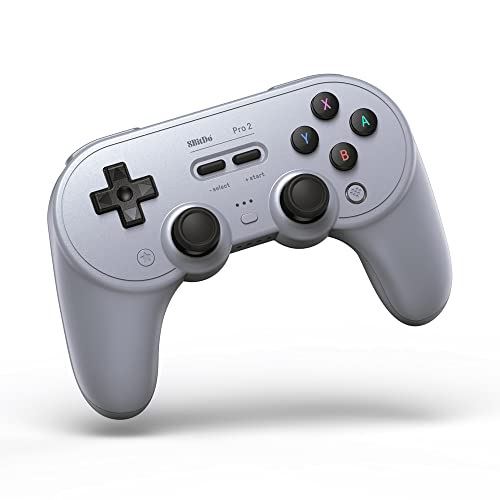


🎮 Level up your game across every platform—because your controller should be as versatile as you are.
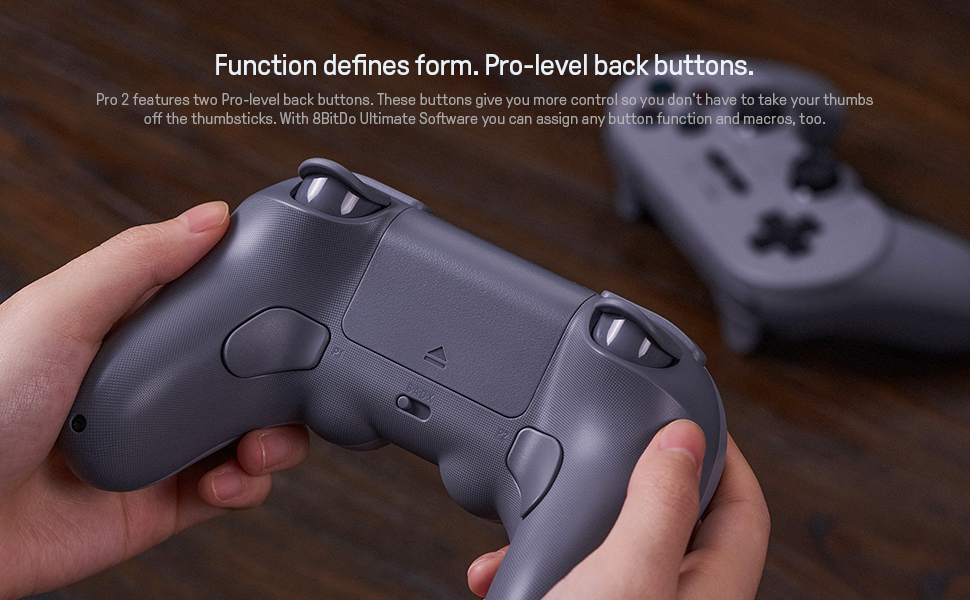
The 8BitDo Pro 2 Bluetooth Controller is a versatile, multi-platform gamepad compatible with Switch, PC, Android, iOS, macOS, and more. Featuring pro-level back buttons, customizable profiles via Ultimate Software, motion controls, and a 20-hour rechargeable battery, it offers a premium gaming experience with enhanced grip and seamless mode switching. Perfect for both retro enthusiasts and competitive gamers seeking precision and adaptability.


| ASIN | B08XY8H9D5 |
| Batteries | 1 Lithium Polymer batteries required. (included) |
| Customer Reviews | 4.6 4.6 out of 5 stars (10,896) |
| Date First Available | March 15, 2021 |
| Item Weight | 8 ounces |
| Item model number | 6922621501725 |
| Language | English |
| Manufacturer | 8Bitdo |
| Product Dimensions | 6.06 x 2.56 x 3.98 inches; 8 ounces |
| Rated | Rating Pending |
| Release date | April 12, 2021 |
| Type of item | Video Game |
S**M
One of the best Switch controllers and works great on PC.
I loved the SN30 Pro+, so I had to pre-order the 8-bit do Pro 2. One new addition is the addition of back buttons, which will prove really useful in games where the only way to use gyro in a game is to map inputs to keyboard and mouse using Steam. The only game I've found where this is actually needed is Call of Duty: Modern Warfare, I used the Steam controller to play the single-player since the Steam controller has back buttons. Now we have another controller with gyro that has extra buttons. Granted, I haven't tested to see how it actually works yet, but there's always a way to emulate buttons on a gamepad. Another nice addition is the addition of a switch that let's you quickly put it into PC/Android/Switch/MacOS mode. The old method of doing this was annoying. The d-pad, analog stick, and gyro all feel a bit different than the SN30 Pro+, clearly 8bitdo is listening to feedback and trying to improve their gamepads-- it would sure be nice if Sony, Microsoft, and Nintendo did this. So I did some really quick, mostly unscientific performance tests to see how the features of the Pro 2 controller work. I'm more of a casual gamer, so this analysis will be more useful for people who don't play as many games. I'll start with the gyro aka tilt controls or motion controls, this will be really important if you play Splatoon 2, or would rather use a gamepad on PC than a kb/m but want more accuracy. Gyro only works in Nintendo Switch mode. Even though the PC recognizes it as a DS4 in Android mode, the gyro will not work. You can't use it in basic PC mode, though, because it recognizes it as an Xbox One controller which has no gyro. For those who don't know how to get gyro controls working on PC, I'll explain. If your game is on Steam, you're good to go. You'll have to enable Steam to detect Switch Pro controllers and then go into controller configuration and configure it for each individual game. The little unlabeled button that most people would miss, right below the controller, allows you to use gyro. Unless the game doesn't recognize gamepad inputs, you're probably going to want to set it to mouse joystick, otherwise set it to mouse. This way you'll be able to aim by tilting the controller, like in Splatoon. If the game is not a Steam game(say Epic Games store or Windows Store), you can use a free program called DS4Windows which will recognize input from the DS4, Switch Pro, and Joy-cons, and convert them to kb/m or xbox inputs, allowing you to use them in almost every game in Windows. Note that the original version was abandoned and picked up by someone else, and is now up to version 3.0. Don't download the old version. Since I used Aimlab for my tests, I had to tell steam to recognize the Pro 2's inputs as a mouse. This may have led to an issue. In short, you'll want to specify a dead zone on gyro controls. If it's too low you won't be able to hit anything because the cursor will be wobbling everywhere. If it's too high, your cursor will just stay there when you're trying to make precise movement. I could not get it to have enough of a dead zone to prevent wobbling, making it hard to line up a precise shot. Strangely, it wasn't an issue with the DS4. And I don't remember this being an issue with the Pro+ a while back. I'm thinking the drivers that DS4Windows installed recently somehow messed up mouse emulation throughout Windows, because I'm having all sorts of issues with DS4Windows and even Steam is having minor issues, like occasional drifting on multiple gamepads. Hopefully the next version will be out and fix that soon. I could have easily fixed this deadzone problem if I was able to configure gyro with DS4Windows, but I have to make do with Steam for now. So as for the results On spidershot precision, which is where gyro aiming really excels I got 70 hits and 3 misses as a high score on a mouse after trying a few times. That was about a 50k score. I know that's really bad, but it's mainly because I haven't been playing shooters much recently. With the Pro 2 I got 65 hits and 4 misses - 43.6k With the Switch Pro I got 58 hits and 8 misses - 38k The day before I had gotten exactly 43.6k with the DS4 and 42k with the Sn30 Pro+ While the DS4 tied the Pro 2, the lack of a good dead zone was causing me to miss on the Pro 2. When I'm able to fix it, I think the Pro 2 will surpass it. Worth noting is that I've used an adapter to play Splatoon 2 with a DS4, and it felt inferior to the SN30 Pro+, but better than the joy-cons. That's just based on instinct, though. I've also done Aim Lab with the Steam controller's tilt controls and the joy-cons, but the scores were *much* lower than the other gamepads, so I didn't bother with them this time. I did gridshot as well, the high scores were 129 hits 6 misses - Pro 2 166 hits 3 misses - Mouse And for the heck of it, I tried an Xbox One controller with an Analog stick, the results were 64 hits 1 miss Note that when I was doing more practice with a mouse I was able to hit 220 targets with 95% accuracy, almost twice that of a gamepad with gyro, though I have noticed that my performance with gamepads goes up proportionally with my performance with a good mouse, as well as my performance with a cheap mouse compared to a good gaming mouse. So maybe it's learning the game, rather than learning the hardware. Okay, conclusion, I did best with a Pro 2 and a DS4, and think with proper mouse emulation, the Pro 2 would surpass the DS4. I'd go with the Pro 2 over the Switch Pro controller in Splatoon 2 myself, but if you like the Switch Pro, then you can probably stick with that, since the differences were not night and day. But I prefer the 8Bitdo gamepads. So for gyro 10/10 The rest of my tests were less scientific. I liked the feel of the d-pad on the Pro 2 more than the Pro+. It felt a little more SNES, whereas oddly, the Pro+ felt more NES. I tried out Contra with a vintage NES controller and a Pro 2, Ninja Gaiden(NES) with a Pro 2, and Contra 3 with a Pro 2. Contra seemed to feel better on an NES controller, but I actually got further with the Pro 2. Ninja Gaiden and Contra 3 felt great on the Pro 2. I'd say you probably can't beat using the gamepad the game was specifically designed for, but the Pro 2 is a great device for retro games if you don't have adapters for the old game pad For D-pad 9/10 So to test the analog stick I did Touhou 15: Legacy of the Lunatic Kingdom on lunatic mode(yikes). I didn't get very far, naturally, since I would normally play SHMUPs on normal difficulty. I tested the M30(an 8bitdo controller with an 8 directional d-pad based off the Saturn controller), Xbox One controller, a DS3, and a Pro 2. I got the furthest with the M30 and it felt the best, no surprise there. Xbox One and Pro 2 were about equal, not really a huge surprise because modern Analog sticks are all made by the same company. To my surprise, I did the worst with the DS3, it seemed harder to do precise movements, which is weird because it seemed to do great in stealth games. But SHMUPs are generally not pressure sensitive, so maybe it's not that weird. I thought the Analog stick on the Pro 2 felt really good, but it didn't translate to significantly better performance, but I didn't really do enough tests to get an accurate impression. I'm going to go out on a limb, though, and say that as far as analog sticks go on modern gamepads, they're pretty interchangeable. Many people in the SHMUP community swear by the DS2, though, so analog sticks may have been better in the past. For now I'm sticking to the M30. As far as the analog stick goes, I'm giving it a 7/10. In conclusion, I'd say the Pro 2 has a really good d-pad, and gyro and analog sticks that are at least on par with the official gamepads. Plus it's cheaper and has more features. It also has pressure-sensitive triggers and a PC, so you can use it for Forza Horizon 4 on PC without problems. Don't hesitate to get this gamepad, even over the Switch Pro controller. It's good that 3rd parties are trying to make high quality controllers now, instead of just cheap knockoff controllers. Maybe one day 8bitdo will make a $150 gamepad designed for eSports, much like the high-end mechanical keyboards and mice they have on PC.
H**K
Super Solid Controller
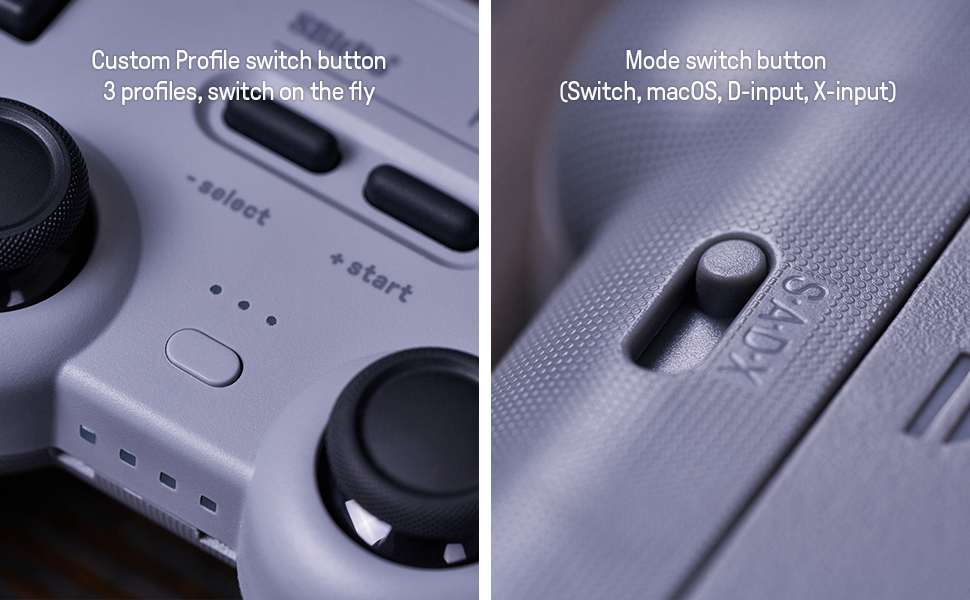
TL;DR: It's an amazing controller, the ultimate software is still a bit new but it is certainly going to improve over time. Definitely worth the investment and I am incredibly happy with it. I've been a fan of 8BitDo for a while now. They put out some really impressive third party hardware that rivals most of Nintendo's own solutions. The SF30 Pro has been my go to controller for emulation and platformers in general on PC and I've used it for years and it even survived acetone and soda being spilled onto it. The Pro 2 is no different. It's an amazing controller that just feels right in the hands, almost like a mixture of the PS4 and Switch Pro controllers. The buttons are nice and responsive and the D-Pad has a nice classic feel to it, great for playing retro games. The textured grip introduced on the back is also a nice addition and just makes the controller feel more solid. The added buttons on the handle are also a welcome addition and useful for programming simple macros or even turbo functions. If you're worried about accidently pressing them they are turned off by default on the main profile and will only be active while switching profiles that you've customized on the new Ultimate Software which I'll talk about later. Some extra features added on this controller are the ability to change the input type on the fly with the switch on the back, a much welcome addition that simplifies the previous task of holding down start with a combination of buttons to activate a specific input. The rechargeable battery pack is also removable and replaceable with two AA batteries, (something that Microsoft should have been doing for years <_<) My only complaints on the hardware of the controller are that it is using a hexagonal screw on the outside. Over the lifetime of a controller it's very possible to spill something in it on accident or have it accumulate dirt, sweat and dust. Most of these problems are easily fixable by just opening up the controller and cleaning out the dirty area with some rubbing alcohol (I had to clean some sticky triggers on one of my SF30s which required taking the controller apart). It's a minor complaint and it's easy enough to get a screwdriver to work with it but it would be nice to just have a philips head to save the hassle. I'd like to mention that when I first hooked the controller up to my Switch I noticed significant input lag, I tested it with my PC and noticed none. I emailed support about it and within a ridiculously fast 10 minutes was emailed a firmware update that fixed any issues which garners a 10/10 in support and responsiveness and has made me a loyal customer for life for certain. The last thing to mention is the Ultimate Software. It's usable on your phone and PC and shines the best when tweaking around with how the controller works on the Switch. You can create up to 3 custom profiles (with there always being a fourth default profile) using the app and switch between them on the fly with a button on the front. The app connects in my experience almost seamlessly to the controller through bluetooth and when you are finished tinkering with your settings will give you the option to flip back to the Switch mode and start playing. I spent some time messing with macros for Smash Brothers and was amazed at how easy it was to work with. There are a few bugs with the software but as I'm writing this review the controller has just released so they are certain to be ironed out in updates if they are as vigilant as they were about sending my firmware update. Overall it's just a nice, solid controller with some neat bells and whistles at a great price. Any complaints I have are minor like not being able to wake a Switch from sleep but it's certainly nothing major. If you're in the market for a new controller I'd definitely suggest picking this one up.
K**R
I like that it's a controller at a great price and has a good grip, reminds me of the good old PS2 days. Got this because I didn't want to spend money on $400 XBox controllers, didn't disappoint. Well packaged, feels premium, cables have great feel, standard stuff. Bluetooth is a little wonky, sometimes it works sometimes it sucks. I recommend wiring the controller to your PC for the intended use of this device. You can also go into Bitdo's website to download some customization for the controller and adjust sensitive of the joysticks. Nothing much to else to say.
S**Z
Her(Apple denemedim) cihazla ve sistemle çalışıyor. Rpi, x86 w11, x86 debian, x86 red hat tabanında ve android 13'te denedim. Sorunsuz. w11 için sitesinden araç indirip firmware güncellemesi yapmak gerekiyor. Olduğu gibi kullanırsanız trigger bazen atlıyor.
S**H
I would highly recommend this nostalgic looking controller, I would loved it more if it had wireless wake-up for the Nintendo Switch but they clearly mentioned this in the description/reciews, so take note of that. Otherwise this is great.
R**E
Had it for a while now. Originally bought it for the Switch but I still use it on my PC now. Lasted more than the two joycons I bought.
K**R
O controle é 100% original, funcionou em todas as plataformas que testei: emulador snes9x e zsnes, dolphin (tanto no celular como no pc), emulador de ps2 (para celular e o pc), além de outros jogos para pc e celular, retroarch e afins. Minha única crítica é a respeito da demora para entrega. O produto ter demorado para chegar é devido a compra ser internacional. Provavelmente é possível achar o mesmo controle com um preço semelhante (talvez 10 reais mais caro) na loja da 8BitDo no AliExpress (mesmo com a compra sendo internacional), porém a demora com certeza será menor que a demora que eu tive nessa compra. Demorou cerca de 45 dias para chegar em minha casa. Do mais, ótimo produto.
Trustpilot
1 day ago
2 months ago


