🚀 Elevate your 3D workflow — because precision waits for no one!
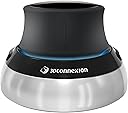
The 3Dconnexion SpaceMouse Compact 3DX-700059 is a sleek, professional-grade 3D navigation device designed for engineers, architects, and designers. Featuring patented 6 degrees of freedom sensor technology, two programmable buttons, and a durable brushed stainless steel base, it delivers precise, intuitive control in CAD applications. Its compact design fits limited desk space, and a 3-year warranty ensures reliable performance for demanding workflows.
| ASIN | B079Z3T2XC |
| Additional Features | Programmable Buttons |
| Antenna Location | Office |
| Best Sellers Rank | #7,526 in Computers ( See Top 100 in Computers ) #225 in Computer Mice |
| Brand | 3Dconnexion |
| Built-In Media | 3Dconnexion SpaceMouse Compact |
| Button Quantity | 2 |
| Color | black / black |
| Compatible Amazon Tablet Models | Amazon Fire 7 9th Generation |
| Compatible Devices | PC |
| Compatible Operating System Family | Windows |
| Compatible Tablet Computer Models | AAUB P30 |
| Compatible devices | PC |
| Connectivity Technology | USB |
| Connectivity technology | USB |
| Customer Reviews | 4.7 out of 5 stars 1,076 Reviews |
| EU Spare Part Availability Duration | 3 Years |
| Enclosure Material | Stainless Steel |
| External Testing Certification | Não aplicável |
| Global Trade Identification Number | 04260016340880 |
| Hand Orientation | Ambidextrous |
| Item Highlight | 3D mouse, precise 3D navigation in six degrees of freedom, special CAD functions, integrated in 300 software + slicer |
| Item Type Name | Spacemause for advanced 3D navigation |
| Item Weight | 0.48 Kilograms |
| Keyboard Description | German keyboard layout |
| Keyboard Layout | QWERTY |
| Keyboard Plate Material | Stainless steel |
| Keyboard description | German keyboard layout |
| Language | English, English, English |
| Manufacturer | 3DConnexion |
| Mfr Part Number | 3DX-700059 |
| Model Name | 3Dconnexion |
| Model Number | 3DX-700059 |
| Number of Items | 1 |
| Number of Keys | 2 |
| Number of Packs | 1 |
| Power Source | Battery Operated |
| Processor Count | 1 |
| Recommended uses for product | Office |
| Special features | Programmable Buttons |
| Style Name | Modern |
| Switch Type | Mechanical |
| Theme | Technology" or "Computer Aided Design |
| Unit Count | 1 Count |
S**5
Se non si prova non si può capire quanto sia comodo!
Disegno da un po' di tempo su Autocad e Fusion360 per realizzare progetti da stampare in 3d e da quando son passato a Macbook è stato necessario prendere un buon mouse per lo scopo. Ma comunque anche così non trovavo comodo dover interrompere sempre il disegno per spostar l'inquadratura, difficoltoso a volte roteare l'oggetto con combinazioni di tasti e mouse. Mi son deciso a provare questo spacemouse viste le recensioni positive da parte di professionisti ed amatori del settore, un po' scettico visto il prezzo elevato ed il fatto che utilizzo quei programmi ogni tanto, non per lavoro. Una volta installato e regolato un minimo per personalizzarlo a mio piacimento però mi son dovuto ricredere! E' veramente incredibile quanto renda il lavoro più semplice e fluido grazie alla possibilità di muovere l'oggetto come fosse in mano. Ammetto che bisogna prenderci confidenza ed allenarsi un minimo per prenderne pieno potere, nel mio caso anche settarlo a dovere per avere i giusti movimenti per me intuitivi, ma una volta imparato ad usare è diventato irrinunciabile. Ho scelto la versione cablata in quanto anche la versione wireless ha sempre bisogno di una porta usb-A che il mio Macbook non ha, quindi dovendo usare un hub tanto vale risparmiare qualcosa ed usare il cavo. Certo va detto che il costo non è proprio dei più economici, quindi se non lo si utilizza con una certa frequenza forse non ha senso acquistarlo, ma utilizzandolo spesso o per lavoro quotidianamente, semplifica e velocizza così tanto l'esperienza che vale ogni centesimo. E' super regolabile, sia nei vari movimenti (ben 6 sui vari assi in entrambe le direzioni), sia nelle regolazioni di feedback degli stessi, le interazioni con tutti i vari programmi compatibili, da renderlo un prodotto completo. I tasti funzione sono solo due ma per chi necessita di più macro esistono le versioni maggiori con base e tasti.
C**R
Muito útil para modelagem 3D
Perfeito para uso no meu modelador 3D preferido (Plasticity).
H**H
Einfach Genial, Präzise, ordentlich Verarbeitet, tolle Materialien, keine Treiberproblme
Ich hab die 3D-Maus hauptsächlich für Fusion 360 gekauft. Vergleichsmodelle habe ich nicht getestet aber meine Erwartungen sind vollends erfüllt. In der ersten Woche der Nutzung war ich etwas mit dem Teil überfordert. Nach Nutzung des Trainingsprogramms und der richtigen Handhabung funktioniert die Navigation durch Fusion 360 völlig problemlos. Pro: - sehr präzise auch auf hoher Geschwindigkeit - sehr feinfühlig - liegt gut in der Hand - schwerer und rutschfester Sockel - ausreichend langes Kabel, qualitativ Hochwertiger USB-Stecker - 2 Buttons haben einen eindeutigen Klickpunkt und sind gut fühlbar - Komfortable zeitsparende Navigation in 3D-Programmen Neutral: - eine gepolsterte Handballenauflage wäre toll (ohne Wertung) - Seriennummer ist am Kabel mit einem Anhänger angebracht. Stört etwas den wertigen Gesamteindruck. Contra: - eigentlich würde ich sagen der Preis, jedoch muss man beachten, wie außerordentlich gut das Gerät verarbeitet und auch zu bedienen ist. Daher habe ich kein wirkliches Manko. Abschließend kann ich die 3DConnexion SpaceMouse Compact nur empfehlen. Sie reagiert präzise und gleichzeitig in Echtzeit und flüssig. Die Software läuft problemlos auf Windows7 und kooperiert prima mit einigen Programmen. Nicht einmal der Preis kann für mich den Gesamteindruck derart trüben, dass ich keine 5 Sterne geben könnte. Ich hoffe die Haltbarkeit spiegelt sich im Preis wieder. Ausgegangen davon, dass ich die Maus wenigstens 5 Jahre nutzen kann, ist sie wiederum nicht zu teuer. Uneingeschränkte Kaufempfehlung für lernwillige 3D-Konstrukteure.
L**S
3Dconnexion SpaceMouse Compact (3D-muis, bedraad, zwart)
supper
M**.
Surprisingly good!
Thought I'd give this a try as I'm using Fusion 360 quite a bit now, I was going to send it back if I didn't like it. This actually exceeded my expectations in how useful it is. I will be keeping it. It only requires very subtle movements and learning to do one movement at a time is a little bit tricky at first, but it comes with training guide and some demo games which are very useful (wish there were more though as they were fun!). I was pushing it round my desk at first as I was being too forceful, but it's fine once you learn to tone things down a bit. Was surprised that it's supported in non-CAD packages such as Word where you can navigate the document using it. Also it allows you to scroll a browser window. It works in OpenSCAD and Prusa Slicer too. It definitely doesn't replace a mouse though, it adds navigation capabilities in addition to the mouse rather than acting as a replacement. Not really using the buttons yet, but they do seem to be very configurable (I'm using Windows). Had a glaring blue LED in it, but fortunately there's an option to turn it off in the advanced settings. It does feel good quality, but think it could be £40 cheaper really. I don't suppose they sell many because of the niche market. I'd definitely recommend this if you are a heavy CAD / 3D Graphics user.
Trustpilot
1 month ago
3 weeks ago